> ## Documentation Index
> Fetch the complete documentation index at: https://cortex-foundation-add13747-droid-2a5c5e50-docs-ferndesk-pro.mintlify.site/llms.txt
> Use this file to discover all available pages before exploring further.
# Security and privacy
> What Cortex stores, what it never stores, which cookies run, where your code executes, and how to export or delete your data.
This page is about **how Cortex handles your data and where code runs**. It is not a status page, and it is not the [Cortex Security](/code/security) product that reviews pull requests.
## Cookies and consent
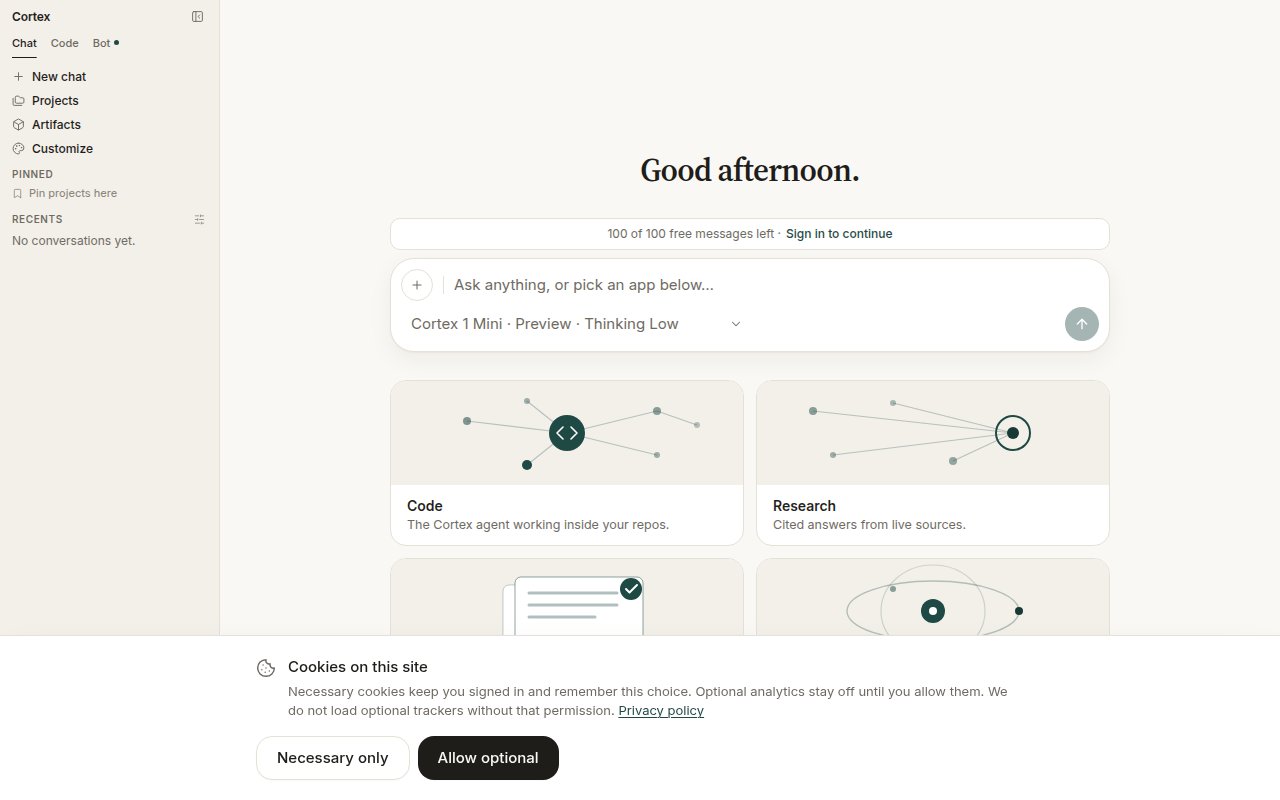
Necessary cookies always run: session, language, and your cookie preference. Optional analytics stay off until you allow them, and a **Global Privacy Control** signal keeps them off. Nothing in the current build loads an optional tracker; the preference is recorded so a future one cannot fire without it.
 ## What Cortex stores
From **Settings → Data & privacy**, in the product's own words: your account details, conversations and attachments while history is on, saved memories, and billing records. **The content of connected apps is never stored** — Cortex reads it at question time, then discards it.
## What Cortex stores
From **Settings → Data & privacy**, in the product's own words: your account details, conversations and attachments while history is on, saved memories, and billing records. **The content of connected apps is never stored** — Cortex reads it at question time, then discards it.
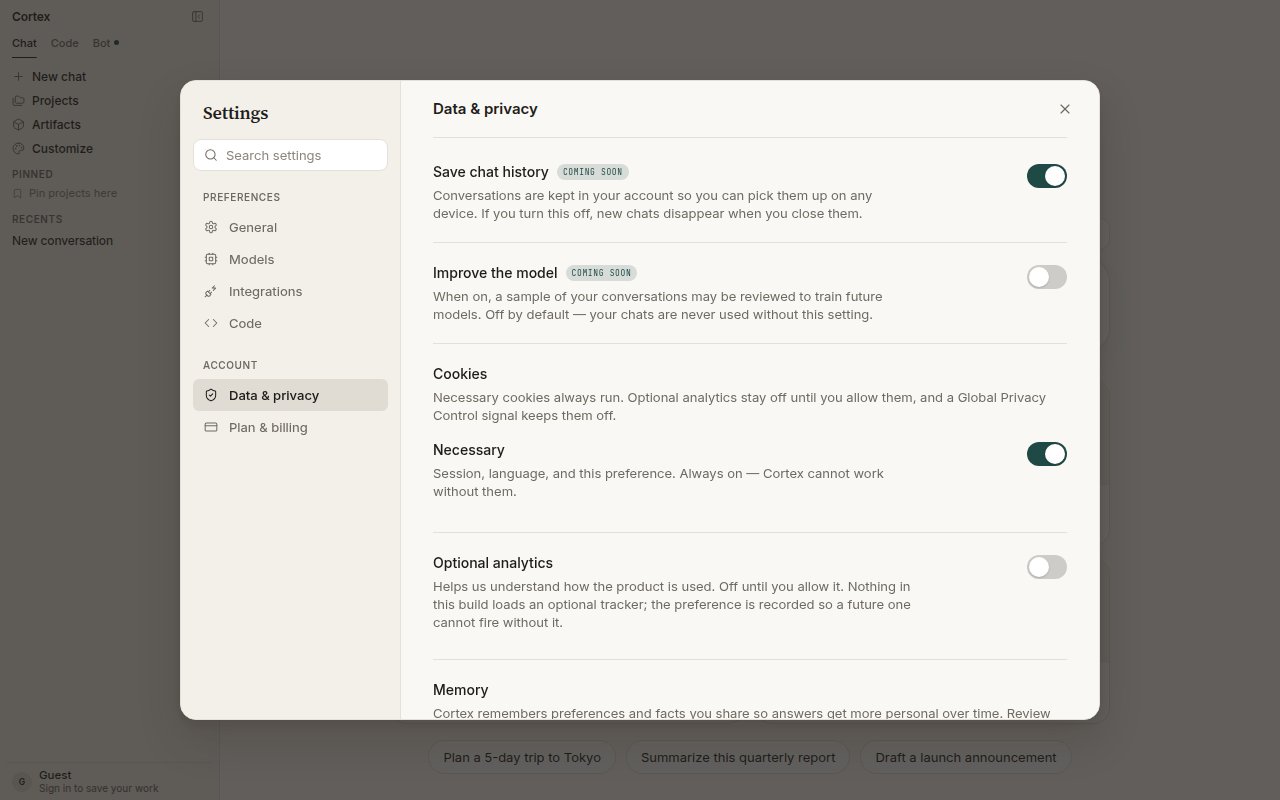 | Control | Default | What it means |
| ------------------------------------ | ------- | ---------------------------------------------------------------------------------------------------------- |
| **Save chat history** | On | Conversations are kept in your account for any device. Off means new chats disappear when you close them. |
| **Improve the model** | Off | Only when on may a sample of your conversations be reviewed to train future models. |
| **Memory** | — | Standing preferences and facts you share, reviewable and deletable one by one. See [Memory](/chat/memory). |
| **Two-factor authentication** | — | A signed-in account uses an authenticator app to confirm export and deletion. |
| **Export my data / Delete all data** | — | Export everything held, or delete it permanently. Deletion takes effect within 30 days. |
These live under **Settings → Data & privacy**; [Settings](/getting-started/settings)
lists where each control is. The table above is what each one stores.
## Permissions
A guest cannot connect a plugin or MCP server, hold a GitHub grant, create a bot, or open Code's working UI. That is fail-closed by design: a guest session cannot be signed back into to revoke a grant later, so it is never allowed to create one.
Connected apps are scoped explicitly. Under **Customize → Connectors** you choose whether each connection is available to **Cortex Chat**, **Cortex Bot**, or both; Bot never inherits a tool you did not assign to it. You stay signed in with the provider — Cortex never sees your passwords.
## What each product can reach
| Product | What it reads | What it can change |
| ------------------- | ---------------------------------------------------------------------------- | --------------------------------------------------------------------------------------------- |
| **Chat** | Files you attach, connected apps enabled for Chat, pages its web tools fetch | Nothing outside your own account and its Library |
| **Code** | The one repository attached to the session | Files in that repository, inside the session's guest |
| **Bot** | Its own computer, and connected apps enabled for Bot | Its desktop and files, plus connected-app changes — parked behind [Approvals](/bot/approvals) |
| **Cortex Security** | The pull request under review, read in place | Nothing. It posts a check run. |
Chat cannot see a repository, a Code session cannot reach a bot's desktop, and a bot cannot read a Code session's files. The products do not share a working surface — see [Where code runs](#where-code-runs).
## Where code runs
| Surface | Where code runs | What it can see |
| ---------------------- | ------------------------------------------------------ | --------------------------------------------------------- |
| Chat's Python tool | A small, untrusted snippet sandbox | The snippet only — no workspace, no repository |
| Code Cloud | An isolated Cloud guest, headless | The repository prepared for that session |
| Code on This PC or SSH | Your machine or your host, from the desktop app or CLI | The project directory you chose |
| Bot computer | An isolated Cloud guest **with** a desktop and a shell | That guest's desktop, browser, and files |
| Cortex Security | Reads the pull request in place on GitHub | The diff under review — nothing is pasted into a composer |
Do not mix them up. Chat Python cannot see a Code repository, and a Code session cannot reach a Bot's desktop.
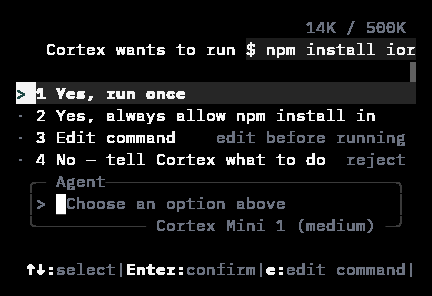
Consequential steps ask first. In Bot, dangerous computer actions and connected-app changes park behind [Allow / Deny / Always](/bot/approvals). In the CLI, every session runs under an approval policy and a sandbox, and the agent asks before it does anything consequential — see [Modes and permissions](/cli/modes-and-permissions).
| Control | Default | What it means |
| ------------------------------------ | ------- | ---------------------------------------------------------------------------------------------------------- |
| **Save chat history** | On | Conversations are kept in your account for any device. Off means new chats disappear when you close them. |
| **Improve the model** | Off | Only when on may a sample of your conversations be reviewed to train future models. |
| **Memory** | — | Standing preferences and facts you share, reviewable and deletable one by one. See [Memory](/chat/memory). |
| **Two-factor authentication** | — | A signed-in account uses an authenticator app to confirm export and deletion. |
| **Export my data / Delete all data** | — | Export everything held, or delete it permanently. Deletion takes effect within 30 days. |
These live under **Settings → Data & privacy**; [Settings](/getting-started/settings)
lists where each control is. The table above is what each one stores.
## Permissions
A guest cannot connect a plugin or MCP server, hold a GitHub grant, create a bot, or open Code's working UI. That is fail-closed by design: a guest session cannot be signed back into to revoke a grant later, so it is never allowed to create one.
Connected apps are scoped explicitly. Under **Customize → Connectors** you choose whether each connection is available to **Cortex Chat**, **Cortex Bot**, or both; Bot never inherits a tool you did not assign to it. You stay signed in with the provider — Cortex never sees your passwords.
## What each product can reach
| Product | What it reads | What it can change |
| ------------------- | ---------------------------------------------------------------------------- | --------------------------------------------------------------------------------------------- |
| **Chat** | Files you attach, connected apps enabled for Chat, pages its web tools fetch | Nothing outside your own account and its Library |
| **Code** | The one repository attached to the session | Files in that repository, inside the session's guest |
| **Bot** | Its own computer, and connected apps enabled for Bot | Its desktop and files, plus connected-app changes — parked behind [Approvals](/bot/approvals) |
| **Cortex Security** | The pull request under review, read in place | Nothing. It posts a check run. |
Chat cannot see a repository, a Code session cannot reach a bot's desktop, and a bot cannot read a Code session's files. The products do not share a working surface — see [Where code runs](#where-code-runs).
## Where code runs
| Surface | Where code runs | What it can see |
| ---------------------- | ------------------------------------------------------ | --------------------------------------------------------- |
| Chat's Python tool | A small, untrusted snippet sandbox | The snippet only — no workspace, no repository |
| Code Cloud | An isolated Cloud guest, headless | The repository prepared for that session |
| Code on This PC or SSH | Your machine or your host, from the desktop app or CLI | The project directory you chose |
| Bot computer | An isolated Cloud guest **with** a desktop and a shell | That guest's desktop, browser, and files |
| Cortex Security | Reads the pull request in place on GitHub | The diff under review — nothing is pasted into a composer |
Do not mix them up. Chat Python cannot see a Code repository, and a Code session cannot reach a Bot's desktop.
Consequential steps ask first. In Bot, dangerous computer actions and connected-app changes park behind [Allow / Deny / Always](/bot/approvals). In the CLI, every session runs under an approval policy and a sandbox, and the agent asks before it does anything consequential — see [Modes and permissions](/cli/modes-and-permissions).
 ## Errors never name a vendor
User-facing error text names a Cortex surface, never a subprocessor. The CLI's outage message is deliberately just *The coding service is temporarily unavailable*. Problem documents carry a stable `code` and a `request_id` you can quote when reporting an issue — see [Errors](/api/errors).
## Cortex Security (pull requests)
GitHub App review of pull requests is a **product**, at `/code/security` in the app and documented under [Cortex Security](/code/security). The public link `cortex.foundation/security` is that product's page, not this article.
## What this page does not claim
Cortex does not claim SOC 2, GDPR certification, or HIPAA compliance in product copy, and neither does this site. Legal documents live at [cortex.foundation/privacy](https://cortex.foundation/privacy), [cortex.foundation/terms](https://cortex.foundation/terms), and [cortex.foundation/ai-disclosures](https://cortex.foundation/ai-disclosures).
The controls above are what the product actually does — what it stores, what it never stores, and where each surface runs. Where a certification would be needed, the honest answer today is that there is no claim to read, and this page will not invent one. If that changes, it will be announced where the rest of Cortex is: the [changelog](/changelog) and [cortex.foundation](https://cortex.foundation).
## Related
* [Accounts](/getting-started/accounts) — what a signed-in account holds.
* [Settings](/getting-started/settings) — the Data & privacy controls in one place.
* [Approvals](/bot/approvals) — how a bot asks before consequential steps.
* [Modes and permissions](/cli/modes-and-permissions) — the CLI's sandbox and approval policy.
* [Errors](/api/errors) — why user-facing text never names a vendor.
## Errors never name a vendor
User-facing error text names a Cortex surface, never a subprocessor. The CLI's outage message is deliberately just *The coding service is temporarily unavailable*. Problem documents carry a stable `code` and a `request_id` you can quote when reporting an issue — see [Errors](/api/errors).
## Cortex Security (pull requests)
GitHub App review of pull requests is a **product**, at `/code/security` in the app and documented under [Cortex Security](/code/security). The public link `cortex.foundation/security` is that product's page, not this article.
## What this page does not claim
Cortex does not claim SOC 2, GDPR certification, or HIPAA compliance in product copy, and neither does this site. Legal documents live at [cortex.foundation/privacy](https://cortex.foundation/privacy), [cortex.foundation/terms](https://cortex.foundation/terms), and [cortex.foundation/ai-disclosures](https://cortex.foundation/ai-disclosures).
The controls above are what the product actually does — what it stores, what it never stores, and where each surface runs. Where a certification would be needed, the honest answer today is that there is no claim to read, and this page will not invent one. If that changes, it will be announced where the rest of Cortex is: the [changelog](/changelog) and [cortex.foundation](https://cortex.foundation).
## Related
* [Accounts](/getting-started/accounts) — what a signed-in account holds.
* [Settings](/getting-started/settings) — the Data & privacy controls in one place.
* [Approvals](/bot/approvals) — how a bot asks before consequential steps.
* [Modes and permissions](/cli/modes-and-permissions) — the CLI's sandbox and approval policy.
* [Errors](/api/errors) — why user-facing text never names a vendor.