> ## Documentation Index
> Fetch the complete documentation index at: https://cortex-foundation-add13747-droid-2a5c5e50-docs-ferndesk-pro.mintlify.site/llms.txt
> Use this file to discover all available pages before exploring further.
# Models and thinking
> Pick a model per conversation from the composer chip, set how long Cortex thinks before answering, and know what happens at peak hours.
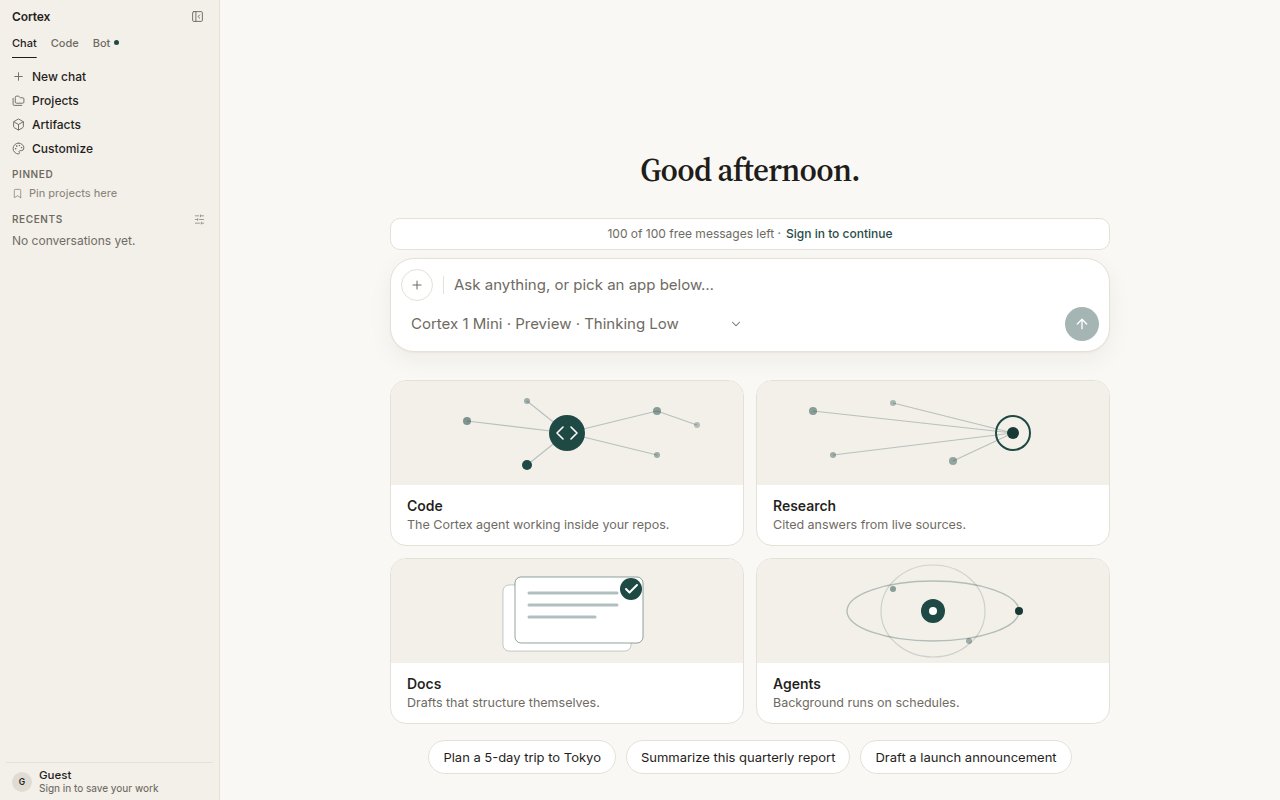
Every conversation runs on a Cortex model. The chip under the composer — *Cortex 1 Mini · Preview · Thinking Low* by default — is where you change it. The choice belongs to the conversation: existing threads keep the model they were created with, and new chats start from the default.
 ## What you can pick
| Model | Status | Context | Capabilities | Role |
| --------------------- | ------- | ------- | ---------------- | ---------------------------------------------------------------------------------------------- |
| **Cortex 1 Mini** | Preview | 262.1K | Reasoning, tools | The model Cortex is serving today. Default for new chats. |
| **Cortex Teutonic-1** | Preview | 32.8K | Reasoning, tools | Second public preview, under active training. |
| **Cortex-Image-1** | Preview | — | Image generation | Used when you ask for a picture. Built on NVIDIA Cosmos. See [Image generation](/chat/images). |
The composer model chip is a Chat control. Web Code has no model picker; the CLI has its own `/model` picker with the same family under English names (**Cortex Mini 1**, **Cortex 1**, **Cortex Max 1**) — see [CLI modes](/cli/modes-and-permissions).
## What you can pick
| Model | Status | Context | Capabilities | Role |
| --------------------- | ------- | ------- | ---------------- | ---------------------------------------------------------------------------------------------- |
| **Cortex 1 Mini** | Preview | 262.1K | Reasoning, tools | The model Cortex is serving today. Default for new chats. |
| **Cortex Teutonic-1** | Preview | 32.8K | Reasoning, tools | Second public preview, under active training. |
| **Cortex-Image-1** | Preview | — | Image generation | Used when you ask for a picture. Built on NVIDIA Cosmos. See [Image generation](/chat/images). |
The composer model chip is a Chat control. Web Code has no model picker; the CLI has its own `/model` picker with the same family under English names (**Cortex Mini 1**, **Cortex 1**, **Cortex Max 1**) — see [CLI modes](/cli/modes-and-permissions).
 ## Thinking level
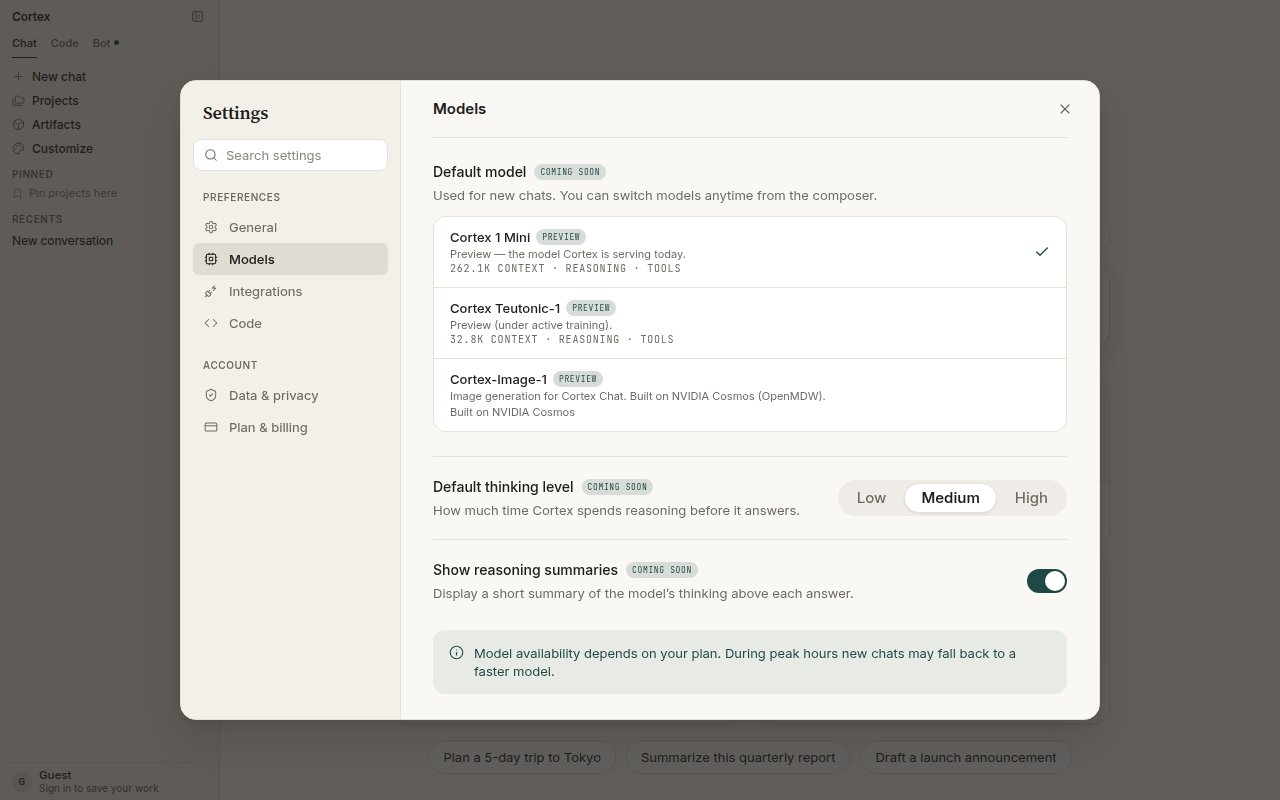
**Low**, **Medium**, or **High**. Higher thinking spends more time before answering and suits multi-step reasoning, careful writing, and anything where a wrong first draft is expensive. Low is right for quick questions. The level is per conversation; a saved default under **Settings → Models** is marked *coming soon*.
**Show reasoning summaries** (also *coming soon* in Settings) displays a short summary of the model's thinking above each answer.
## Deep Research
The toggle at the bottom of the chip turns a conversation into a research run: plan the questions, read live sources, and write a cited report. It is a Chat feature only. See [Deep Research](/chat/deep-research).
## How a turn uses the model
1. You pick the model on the conversation.
2. Chat assembles the prompt — your message, attachments from Library, memory, project instructions, tool results — and clamps generation so prompt plus output fit the model's context window.
3. The model runs the tool loop until it stops or reaches Chat's round budget. See [How Chat works](/chat/how-it-works).
Completions for Teutonic use their own upstream. If that upstream is not configured on a deployment, the request fails closed before any quota is spent and never falls through to Mini.
## Availability and peak hours
Model availability depends on your plan. During peak hours new chats may fall back to a faster model; the chip always tells you which model is serving the conversation. Go and higher plans get priority when the fleet is busy — see [Plans](/getting-started/plans).
## What this page is not
There is no public inference API on this site. Model names here are product names inside Cortex Chat, not endpoints. See [Coming soon](/platform).
## Related
* [Streaming](/chat/streaming) — tokens as they arrive.
* [Settings](/getting-started/settings) — defaults for new chats.
* [Plans and quotas](/getting-started/plans) — quotas fail closed.
## Thinking level
**Low**, **Medium**, or **High**. Higher thinking spends more time before answering and suits multi-step reasoning, careful writing, and anything where a wrong first draft is expensive. Low is right for quick questions. The level is per conversation; a saved default under **Settings → Models** is marked *coming soon*.
**Show reasoning summaries** (also *coming soon* in Settings) displays a short summary of the model's thinking above each answer.
## Deep Research
The toggle at the bottom of the chip turns a conversation into a research run: plan the questions, read live sources, and write a cited report. It is a Chat feature only. See [Deep Research](/chat/deep-research).
## How a turn uses the model
1. You pick the model on the conversation.
2. Chat assembles the prompt — your message, attachments from Library, memory, project instructions, tool results — and clamps generation so prompt plus output fit the model's context window.
3. The model runs the tool loop until it stops or reaches Chat's round budget. See [How Chat works](/chat/how-it-works).
Completions for Teutonic use their own upstream. If that upstream is not configured on a deployment, the request fails closed before any quota is spent and never falls through to Mini.
## Availability and peak hours
Model availability depends on your plan. During peak hours new chats may fall back to a faster model; the chip always tells you which model is serving the conversation. Go and higher plans get priority when the fleet is busy — see [Plans](/getting-started/plans).
## What this page is not
There is no public inference API on this site. Model names here are product names inside Cortex Chat, not endpoints. See [Coming soon](/platform).
## Related
* [Streaming](/chat/streaming) — tokens as they arrive.
* [Settings](/getting-started/settings) — defaults for new chats.
* [Plans and quotas](/getting-started/plans) — quotas fail closed.